voidcheckThread(){if(mThread!=Thread.currentThread()){thrownewCalledFromWrongThreadException("Only the original thread that created a view hierarchy can touch its views.");}}
publicHandler(Callbackcallback,booleanasync){...mLooper=Looper.myLooper();if(mLooper==null){thrownewRuntimeException("Can't create handler inside thread that has not called Looper.prepare()");}mQueue=mLooper.mQueue;mCallback=callback;mAsynchronous=async;}
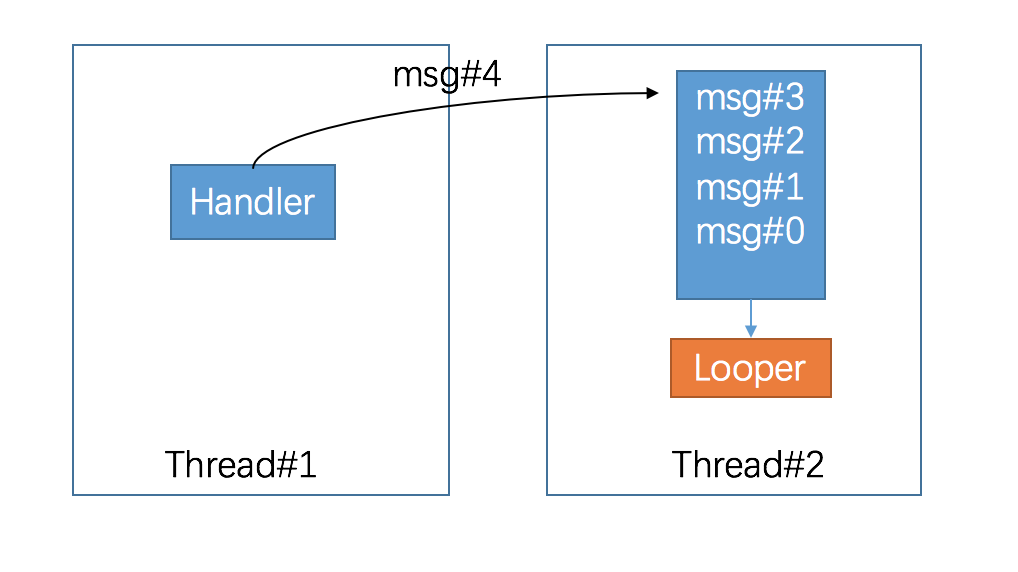
在Handler构造方法中可以看到,如果mLooper==null,则会抛出异常提示“Can’t create handler inside thread that has not called Looper.prepare()”. 那么这样看来我们创建Looper对象实例,然后set进ThreadLocal就是在所谓的Looper.prepare()中进行的了~。
验证:
123456
privatestaticvoidprepare(booleanquitAllowed){if(sThreadLocal.get()!=null){thrownewRuntimeException("Only one Looper may be created per thread");}sThreadLocal.set(newLooper(quitAllowed));}
嗯,如此的完美,并且还有友好的提示,如果ThreadLocal中已经设置过Looper则抛出异常"Only one Looper may be created per thread",所以我们可以得出一个结论:一个线程只拥有一个Looper对象
/** * Initialize the current thread as a looper, marking it as an * application's main looper. The main looper for your application * is created by the Android environment, so you should never need * to call this function yourself. See also: {@link #prepare()} */publicstaticvoidprepareMainLooper(){prepare(false);synchronized(Looper.class){if(sMainLooper!=null){thrownewIllegalStateException("The main Looper has already been prepared.");}sMainLooper=myLooper();}}/** Returns the application's main looper, which lives in the main thread of the application. */publicstaticLoopergetMainLooper(){synchronized(Looper.class){returnsMainLooper;}}
/** * Run the message queue in this thread. Be sure to call * {@link #quit()} to end the loop. */publicstaticvoidloop(){finalLooperme=myLooper();if(me==null){thrownewRuntimeException("No Looper; Looper.prepare() wasn't called on this thread.");}finalMessageQueuequeue=me.mQueue;// Make sure the identity of this thread is that of the local process,// and keep track of what that identity token actually is.Binder.clearCallingIdentity();finallongident=Binder.clearCallingIdentity();for(;;){Messagemsg=queue.next();// might blockif(msg==null){// No message indicates that the message queue is quitting.return;}// This must be in a local variable, in case a UI event sets the loggerPrinterlogging=me.mLogging;if(logging!=null){logging.println(">>>>> Dispatching to "+msg.target+" "+msg.callback+": "+msg.what);}msg.target.dispatchMessage(msg);if(logging!=null){logging.println("<<<<< Finished to "+msg.target+" "+msg.callback);}// Make sure that during the course of dispatching the// identity of the thread wasn't corrupted.finallongnewIdent=Binder.clearCallingIdentity();if(ident!=newIdent){Log.wtf(TAG,"Thread identity changed from 0x"+Long.toHexString(ident)+" to 0x"+Long.toHexString(newIdent)+" while dispatching to "+msg.target.getClass().getName()+" "+msg.callback+" what="+msg.what);}msg.recycle();}}